
Usually you need to send a document as an attachment to an e-mail, to jon.idle@btinternet.com. Most people send Word documents, which are easiest, but I can also work on PDFs. Please note that anti-virus software will prevent you sending anything of an obscene nature, or anything that looks like phishing.
I will make corrections and suggestions by using the ‘review’ and ‘track changes’ options in Word, as shown below, so you can see my proposed changes and then make those changes yourself. Some of these will simply be corrections, but some will be queries – for example, checking for consistency if you have used a different spelling or phrase for the same thing in different parts of a document. I will not make more subjective comments on style unless we have agreed that in advance. I am always willing to explain any changes which are not straightforward corrections.
An example of how my comments will look:
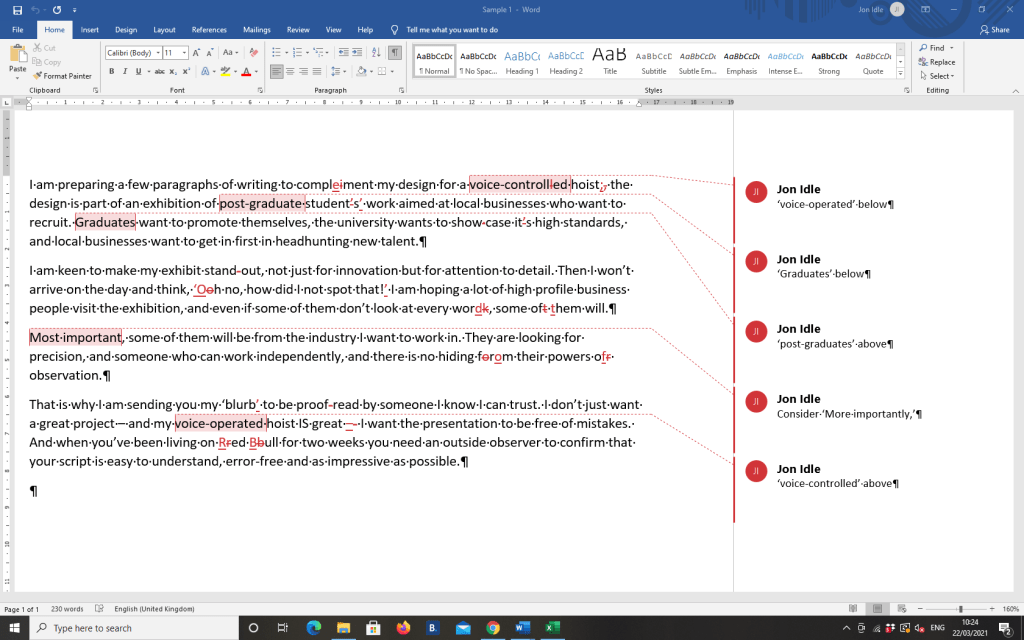
And an explanation of why I made some of those changes and comments:
Line 1 says ‘voice-controlled, but line 12 says ‘voice-operated’. Either of these would be fine, but it’s usually best to use one or the other consistently; the same with ‘post-graduate’ and ‘graduate’ in lines 2 and 3.
Lines 7 and 9 show examples of common errors a spell-checker won’t notice – ‘work’ and ‘word’ are both real words; so are ‘form’ and ‘from’. And if you turn ‘of them’ into ‘oft hem’, they are also words that your computer won’t correct.
Line 8: ‘Most important’ isn’t wrong, but doesn’t suit the style of the rest of the script.
Line 11: Many people use a hyphen in ‘proof-read’ but I am sticking to the preferred ‘proofread’ of my professional body, CIEP.
Line 12: The hyphen after ‘great’ has been changed to an en dash (slightly longer). The en dash after ‘project’ was already correct.

 Accuracy Works